Garage Job Costing Template Excel: Build One That Shows Your Workshop’s Real Margins
27 September 2026 · 8 min read
Written by Daniel Staples — Director, MechanicX. Workshop operator and developer of MechanicX garage management software.

A repair can look profitable on the invoice while quietly shrinking your workshop’s margin. If parts and labour aren’t recorded consistently against each job, it’s difficult to see what remains once the work is done. When the workshop is busy, spreadsheet updates can also slip. A garage job costing template Excel users can build with clear columns and formulas offers a practical starting point, but its figures are only as reliable as the job data behind them.
This guide explains how to set up the template, choose useful formulas and track the costs that affect each job’s result. It also clarifies the difference between markup, margin and profit, so you can compare jobs on a consistent basis.
Finally, we’ll cover where Excel can create extra admin and when connected garage software may better suit your workflow. You’ll see what a spreadsheet can help you track, what it can’t do on its own, and what to consider next.
Why a Garage Job Costing Template in Excel Can Misstate Your Workshop’s Profit
Job costing means tracking a repair’s income and the costs attributable to it, so you can assess the result. A garage job costing template in Excel can make those figures visible, but it can’t fix missing or misfiled entries. If a parts invoice is attached to the wrong job, or labour hours are entered inconsistently, the result will be distorted.
Overhead matters too. Rent, utilities, insurance and equipment costs don’t belong to one repair alone, so you’ll need a consistent way to allocate a share to each job. Leaving overhead out can make the apparent profit look higher than the workshop’s actual result. Changing the allocation method from job to job also makes comparisons less useful.
Which costs belong against a garage job?
- Parts: Record the actual cost of parts used for the repair. Update the entry if parts are returned or a credit is received.
- Labour: Track productive time spent on the job and apply a consistent internal labour-cost rate. The technician’s wage cost is not the same as the labour rate charged to the customer.
- Allocated overhead: Apply a share of running costs using one clear basis, such as productive hours. Note the method in your template so you can compare results fairly.
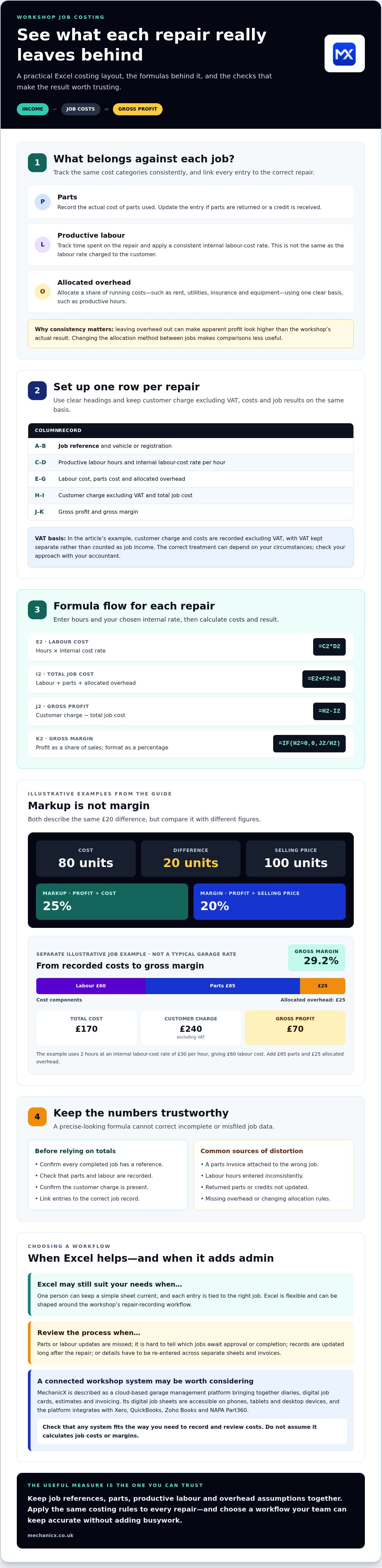
Markup and margin are different measures. Markup compares profit with cost, while margin compares profit with the selling price. For example, if a job’s cost is 80 units and its selling price is 100 units, the difference is 20 units: a 25% markup on cost, but a 20% margin on the selling price.
That calculation is useful only when income, parts, labour and overhead are complete, consistent and linked to the correct job. Use the same costing rules throughout the spreadsheet. Otherwise, a formula can look precise while producing a misleading result.
How to Build a Garage Job Costing Template in Excel: Fields and Formulas
Start with one row per repair and use clear headings. A practical garage job costing template Excel sheet could use these columns:
- A: Job reference; B: vehicle or registration
- C: productive labour hours; D: internal labour-cost rate per hour
- E: labour cost; F: parts cost; G: allocated overhead
- H: customer charge excluding VAT; I: total job cost; J: gross profit; K: gross margin
Use one VAT basis throughout the sheet. In this example, customer charge and costs are recorded excluding VAT, with VAT kept separate rather than counted as job income. The correct treatment can depend on your circumstances, so check your approach with your accountant.
A simple Excel formula sequence for each repair
Enter your chosen internal labour-cost rate in D2 and the job’s hours in C2. In E2, calculate labour cost with =C2*D2. In I2, add the recorded costs with =E2+F2+G2. In J2, calculate gross profit with =H2-I2. In K2, calculate margin as a share of sales with =IF(H2=0,0,J2/H2). Format K as a percentage.
Illustrative example only, not a typical garage rate: 2 hours at an internal labour-cost rate of £30 gives £60 labour cost. Add £85 parts and £25 allocated overhead for a £170 total cost. With a customer charge of £240 excluding VAT, gross profit is £70 and margin is 29.2%.
Copy the formulas down and check each row against the correct job record. A useful routine is to confirm that every completed job has a reference, recorded parts and labour, and a customer charge before relying on the totals. If entering the same information in multiple places creates extra admin, connected digital job sheets and invoicing may be worth considering.
When to Move Beyond Excel for Garage Job Costing
Excel is flexible. You can shape a garage job costing template around the way your workshop records repairs without changing the whole workflow. The trade-off is maintenance. If job details sit in one sheet, parts in another and invoices elsewhere, someone has to keep them aligned. Re-entering information takes time and increases the chance that records will differ.
Look for practical warning signs: parts or labour updates are missed, it’s hard to tell which jobs are awaiting approval or completion, or financial records are updated long after the repair. These issues make it harder to trust your view of workshop activity and job results. If one person can keep a simple sheet current and each entry is tied to the right job, Excel may still suit your needs.
Choose a spreadsheet or connected workshop system
A connected system may be worth considering when the spreadsheet is adding admin instead of reducing it. MechanicX is a cloud-based garage management platform that brings together diaries, digital job cards, estimates and invoicing. It connects workshop records and customer paperwork, but don’t assume it calculates job costs or margins. Check that any system fits the way you need to record and review costs.
For a closer look at how job records can work, read this guide to a garage job card template. If you’re weighing up broader workflow needs, the garage management guide can help you compare approaches. The right choice is the one your team can keep accurate without creating another layer of busywork.
Build a Clearer View of Every Workshop Job
A garage job costing template Excel users maintain consistently can show where each repair’s income and costs stand. Keep job references, parts, productive labour and overhead assumptions together, and apply the same rules to every repair. If updates are missed or information has to be entered in several places, the spreadsheet may create admin instead of clarity.
For a more connected workflow, MechanicX brings together diaries, digital job cards, estimates and invoicing. Digital job sheets are accessible on phones, tablets and desktop devices. The platform also integrates with Xero, QuickBooks, Zoho Books and NAPA Part360. These tools help organise workshop records, but don’t assume they calculate job costs or margins.
See how MechanicX brings workshop jobs and administration together. Start with the process your team can keep accurate, then build from there. Clearer records are a practical step towards better-informed decisions.
Frequently Asked Questions
Can I use an Excel spreadsheet to calculate the cost of each garage job?
Yes. A garage job costing template excel sheet can use formulas to total recorded labour, parts and allocated overhead, then compare those costs with the customer charge. The result is dependable only if entries are complete, consistent and linked to the right job. Keep VAT separate from income in your calculation, and check the correct treatment for your circumstances with an accountant.
What should a garage job costing template include?
A useful garage job costing template excel worksheet should include a unique job reference and vehicle details, plus labour hours, your chosen internal labour-cost rate, parts cost, allocated overhead and customer charge. Add formula columns for total cost, gross profit and gross margin. Record the VAT basis clearly, so you don’t compare a charge including VAT with costs recorded excluding it.
How do you calculate labour cost and profit on a garage job?
Multiply productive labour hours by your chosen internal labour-cost rate to get labour cost. Add that figure to parts cost and allocated overhead for total job cost. Subtract total cost from customer revenue, recorded on the same VAT basis, to calculate gross profit. Divide gross profit by customer revenue and multiply by 100 for gross margin. Margin uses revenue as its denominator.
When should a garage replace an Excel job-costing sheet with software?
Review your process if staff repeatedly enter the same details, job or parts updates are missed, job status is unclear, or financial records are delayed. Excel can remain suitable if one person can keep it accurate. If you need connected records, MechanicX brings together diaries, digital job cards, estimates and invoicing. It doesn’t claim to calculate job costs or margins.
Frequently Asked Questions
Which costs belong against a garage job?
Markup and margin are different measures. Markup compares profit with cost, while margin compares profit with the selling price. For example, if a job’s cost is 80 units and its selling price is 100 units, the difference is 20 units: a 25% markup on cost, but a 20% margin on the selling price. That calculation is useful only when income, parts, labour and overhead are complete, consistent and linked to the correct job. Use the same costing rules throughout the spreadsheet. Otherwise, a formula can look precise while producing a misleading result. Start with one row per repair and use clear headings. A practical garage job costing template Excel sheet could use these columns: Use one VAT basis throughout the sheet. In this example, customer charge and costs are recorded excluding VAT, with VAT kept separate rather than counted as job income. The correct treatment can depend on your circumstances, so check your approach with your accountant.
Can I use an Excel spreadsheet to calculate the cost of each garage job?
Yes. A garage job costing template excel sheet can use formulas to total recorded labour, parts and allocated overhead, then compare those costs with the customer charge. The result is dependable only if entries are complete, consistent and linked to the right job. Keep VAT separate from income in your calculation, and check the correct treatment for your circumstances with an accountant.
What should a garage job costing template include?
A useful garage job costing template excel worksheet should include a unique job reference and vehicle details, plus labour hours, your chosen internal labour-cost rate, parts cost, allocated overhead and customer charge. Add formula columns for total cost, gross profit and gross margin. Record the VAT basis clearly, so you don’t compare a charge including VAT with costs recorded excluding it.
How do you calculate labour cost and profit on a garage job?
Multiply productive labour hours by your chosen internal labour-cost rate to get labour cost. Add that figure to parts cost and allocated overhead for total job cost. Subtract total cost from customer revenue, recorded on the same VAT basis, to calculate gross profit. Divide gross profit by customer revenue and multiply by 100 for gross margin. Margin uses revenue as its denominator.
When should a garage replace an Excel job-costing sheet with software?
Review your process if staff repeatedly enter the same details, job or parts updates are missed, job status is unclear, or financial records are delayed. Excel can remain suitable if one person can keep it accurate. If you need connected records, MechanicX brings together diaries, digital job cards, estimates and invoicing. It doesn’t claim to calculate job costs or margins.
More articles



Try MechanicX free for 30 days
No card required. Set up in an afternoon and book tomorrow's jobs into it — that's the real test.