Garage Financial Management: A Practical Guide for 2026
29 September 2026 · 8 min read
Written by Daniel Staples — Director, MechanicX. Workshop operator and developer of MechanicX garage management software.

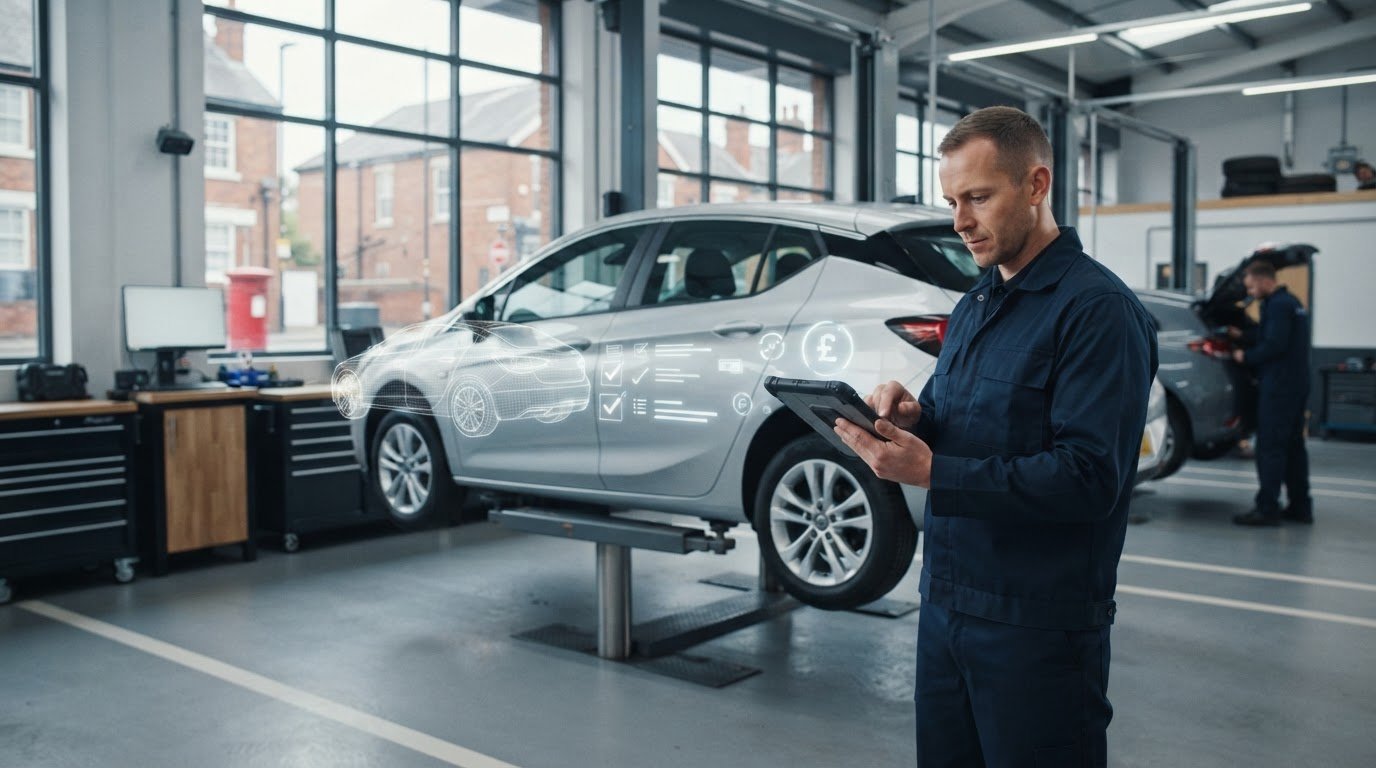
What if a clearer picture of your garage’s finances started with the job records you already create, rather than another end-of-year spreadsheet? When costs and income are logged late, it’s hard to see which work is paying its way or what cash is coming in. Practical auto repair shop financial management starts with clean, consistent records and a review routine you can keep up with.
This guide explains how to track workshop income and costs by job, service and period, spot cash-flow pressure earlier, and make sense of the numbers without adding unnecessary admin. You’ll also learn how to keep workshop activity and accounting records connected, and how to compare software with spreadsheets and paper records. The aim is a straightforward system that gives you more clarity, not more work.
Auto repair shop financial management starts with job-level records
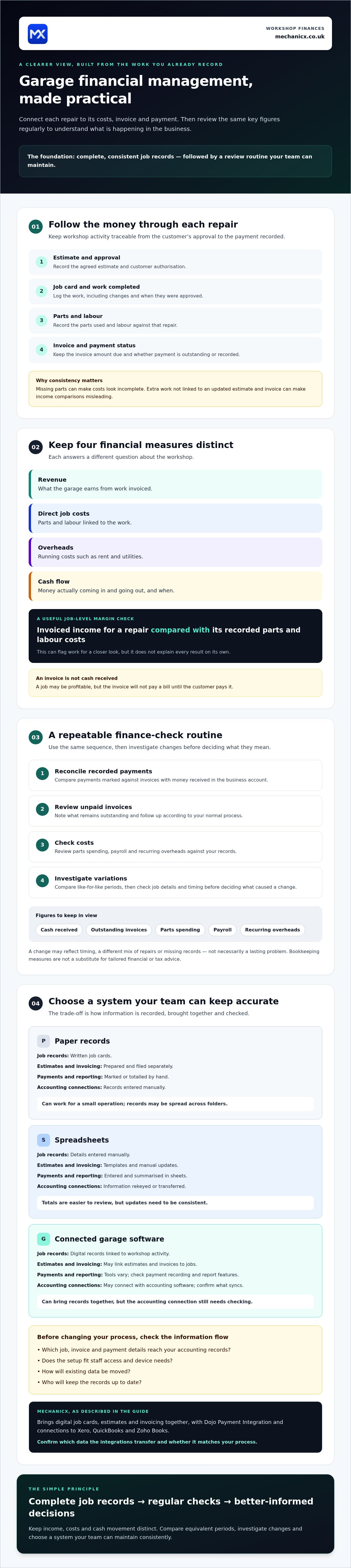
Auto repair shop financial management means recording, checking and acting on the money coming in, the costs of doing the work and the movement of cash through the business. Start with each repair. Follow it from estimate and customer approval through the job card, parts and labour used, final invoice and recorded payment. This creates a traceable link between the work completed and what appears in your accounts.
Consistent job records make financial checks more useful because they let you compare similar work instead of guessing what a job earned or cost.
Which records should a garage keep for each repair?
Keep the key details together, whether you use paper, spreadsheets or garage software:
- Customer authorisation and the agreed estimate.
- Work completed, including changes to the original estimate and when they were approved.
- Parts used and labour recorded against the job.
- Invoice issued, amount due and whether payment is outstanding or recorded.
These details help you check an individual job, compare similar repairs and review results over a chosen period. For example, if parts are missing from some job records, your apparent parts costs may be incomplete. If extra work isn’t linked to an updated estimate and invoice, income comparisons may be misleading. Those gaps also make it harder to identify which types of work need a closer look.
A clear, repeatable job card is a practical starting point. See this guide to garage job card templates for ideas on what to capture. Digital job sheets can link workshop activity to job records, while accounting integrations may help keep financial administration connected. Check that any tool fits the way your workshop records work.
How to review garage cash flow, costs and job profitability
A useful review turns job records into decisions. Keep the measures distinct: revenue is what the garage earns from work invoiced; direct job costs are the parts and labour linked to that work; overheads are running costs such as rent and utilities. Cash flow tracks money actually coming in and going out, and when. An invoice may be profitable, but it won’t pay a bill until the customer pays it.
Use the same simple routine each time:
- Reconcile recorded payments: compare payments marked against invoices with the money received in the business account.
- Review unpaid invoices: note what remains outstanding and follow up according to your normal process.
- Check costs: review parts spending, payroll and recurring overheads against your records.
- Investigate variations: compare figures with a like-for-like period, then check job details and timing before deciding what caused a change.
A useful job-level margin check compares a repair’s invoiced income with the direct parts and labour costs recorded against that same job. It won’t explain every result on its own, but it can flag work that needs a closer look before you draw conclusions.
Which garage financial figures should you check regularly?
Track cash received, outstanding invoices, parts spending, payroll and recurring overheads. Compare the same measures across equivalent periods, such as one month against the previous month, and investigate changes before assuming the cause. A shift may reflect timing, a different mix of repairs or missing records, rather than a lasting problem.
These checks support day-to-day decisions, but bookkeeping measures aren’t a substitute for tailored financial or tax advice. If connected job and invoice records would help your routine, explore garage management software and check whether it fits your current process.
Choose a financial management system that fits your workshop
The right setup is the one your team can keep accurate. Paper can work for a small operation, but records may be spread across folders. Spreadsheets make totals easier to review, but rely on consistent updates. Connected garage software can bring job records, estimates and invoices together, though you’ll still need to check how information reaches your accounts.
| Record or task | Paper | Spreadsheets | Connected garage software |
|---|---|---|---|
| Job records | Written job cards | Manually entered details | Digital job records linked to workshop activity |
| Estimates and invoicing | Prepared and filed separately | Templates and manual updates | May link estimates and invoices to jobs |
| Payments and reporting | Marked or totalled by hand | Entered and summarised in sheets | Tools vary; check payment recording and report features |
| Accounting connections | Records entered manually | Rekeyed or transferred | May connect with accounting software; confirm what syncs |
Check compatibility before choosing tools: a connection only helps if the right job, invoice and payment details reach the records you rely on. MechanicX brings digital job cards, estimates and invoicing together, with Dojo Payment Integration and connections to Xero, QuickBooks and Zoho Books. Before deciding, confirm which data the integrations transfer and whether that matches your process.
What should you check before changing your garage finance process?
Map how jobs, invoices and payments will reach your accounting records. Check staff access, device needs, how existing data will be moved and who will keep records up to date. The 2026 garage management and workshop invoicing and payments guide offers further context. To see how connected records could fit your workflow, explore MechanicX garage management software.
Make your next finance check easier to act on
Strong auto repair shop financial management starts with complete job records, followed by regular checks of income, costs and cash movement. Keep those figures distinct, compare like-for-like periods and investigate changes before deciding what they mean. The best system is one your team can maintain consistently, whether that’s paper, a spreadsheet or connected software.
MechanicX brings a cloud-based diary, digital job sheets, estimates and invoicing together in one platform. Its integrations include Dojo, Xero, QuickBooks, Zoho Books and NAPA Part360. Check current integration capabilities and data-sync details before choosing tools or changing your process.
Want to see whether connected workshop records could suit your setup? See how MechanicX can help organise your workshop records. Start with one manageable routine, keep records current and build a clearer view of how your garage is doing.
Frequently Asked Questions
How can an auto repair shop improve its cash flow?
Improve cash flow by keeping invoices current, recording payments promptly and reviewing what customers still owe. Check upcoming supplier, payroll and overhead payments against expected money coming in so you can spot a potential shortfall early. A simple rolling cash forecast can help you plan. Regular, accurate records make the forecast more useful, whether you keep them on paper, in a spreadsheet or in software.
Which financial figures should a garage monitor?
Monitor cash received, unpaid invoices, parts spending, payroll and recurring overheads. Keep invoiced revenue separate from cash collected because they show different things. Review direct costs against the jobs they relate to, and compare results with a like-for-like period. If a figure changes, check invoice timing, job records and costs before assuming the cause. These checks help you decide what needs a closer look.
Can garage management software help with financial records?
Yes. Garage management software can connect workshop job records with estimates and invoices, helping you maintain a clearer record of activity. MechanicX brings these tools together and offers integrations with Dojo, Xero, QuickBooks and Zoho Books. Check current integration capabilities and what data synchronises before choosing a system. Software can support auto repair shop financial management, but records still need to be checked and kept up to date.
How do I work out whether a repair job was profitable?
Compare the job’s invoiced income with its recorded direct costs, especially parts and labour. The difference shows what remains before overheads such as rent, utilities and general operating costs are considered. Make sure all work completed, parts used and estimate changes are recorded against the correct job. For a fuller profit picture, decide how you’ll account for overheads, and seek tailored financial advice if needed.
Frequently Asked Questions
Which records should a garage keep for each repair?
Keep the key details together, whether you use paper, spreadsheets or garage software: These details help you check an individual job, compare similar repairs and review results over a chosen period. For example, if parts are missing from some job records, your apparent parts costs may be incomplete. If extra work isn’t linked to an updated estimate and invoice, income comparisons may be misleading. Those gaps also make it harder to identify which types of work need a closer look. A clear, repeatable job card is a practical starting point. See this guide to garage job card templates for ideas on what to capture. Digital job sheets can link workshop activity to job records, while accounting integrations may help keep financial administration connected. Check that any tool fits the way your workshop records work. A useful review turns job records into decisions. Keep the measures distinct: revenue is what the garage earns from work invoiced; direct job costs are the parts and labour linked to that work; overheads are running costs such as rent and utilities. Cash flow tracks money actually coming in and going out, and when. An invoice may be profitable, but it won’t pay a bill until the customer pays it. Use the same simple routine each time: A useful job-level margin check compares a repair’s invoiced income with the direct parts and labour costs recorded against that same job. It won’t explain every result on its own, but it can flag work that needs a closer look before you draw conclusions.
Which garage financial figures should you check regularly?
Track cash received, outstanding invoices, parts spending, payroll and recurring overheads. Compare the same measures across equivalent periods, such as one month against the previous month, and investigate changes before assuming the cause. A shift may reflect timing, a different mix of repairs or missing records, rather than a lasting problem. These checks support day-to-day decisions, but bookkeeping measures aren’t a substitute for tailored financial or tax advice. If connected job and invoice records would help your routine, explore garage management software and check whether it fits your current process. The right setup is the one your team can keep accurate. Paper can work for a small operation, but records may be spread across folders. Spreadsheets make totals easier to review, but rely on consistent updates. Connected garage software can bring job records, estimates and invoices together, though you’ll still need to check how information reaches your accounts. Check compatibility before choosing tools: a connection only helps if the right job, invoice and payment details reach the records you rely on. MechanicX brings digital job cards, estimates and invoicing together, with Dojo Payment Integration and connections to Xero, QuickBooks and Zoho Books. Before deciding, confirm which data the integrations transfer and whether that matches your process.
What should you check before changing your garage finance process?
Map how jobs, invoices and payments will reach your accounting records. Check staff access, device needs, how existing data will be moved and who will keep records up to date. The 2026 garage management and workshop invoicing and payments guide offers further context. To see how connected records could fit your workflow, explore MechanicX garage management software. Strong auto repair shop financial management starts with complete job records, followed by regular checks of income, costs and cash movement. Keep those figures distinct, compare like-for-like periods and investigate changes before deciding what they mean. The best system is one your team can maintain consistently, whether that’s paper, a spreadsheet or connected software. MechanicX brings a cloud-based diary, digital job sheets, estimates and invoicing together in one platform. Its integrations include Dojo, Xero, QuickBooks, Zoho Books and NAPA Part360. Check current integration capabilities and data-sync details before choosing tools or changing your process. Want to see whether connected workshop records could suit your setup? See how MechanicX can help organise your workshop records. Start with one manageable routine, keep records current and build a clearer view of how your garage is doing.
How can an auto repair shop improve its cash flow?
Improve cash flow by keeping invoices current, recording payments promptly and reviewing what customers still owe. Check upcoming supplier, payroll and overhead payments against expected money coming in so you can spot a potential shortfall early. A simple rolling cash forecast can help you plan. Regular, accurate records make the forecast more useful, whether you keep them on paper, in a spreadsheet or in software.
Which financial figures should a garage monitor?
Monitor cash received, unpaid invoices, parts spending, payroll and recurring overheads. Keep invoiced revenue separate from cash collected because they show different things. Review direct costs against the jobs they relate to, and compare results with a like-for-like period. If a figure changes, check invoice timing, job records and costs before assuming the cause. These checks help you decide what needs a closer look.
Can garage management software help with financial records?
Yes. Garage management software can connect workshop job records with estimates and invoices, helping you maintain a clearer record of activity. MechanicX brings these tools together and offers integrations with Dojo, Xero, QuickBooks and Zoho Books. Check current integration capabilities and what data synchronises before choosing a system. Software can support auto repair shop financial management, but records still need to be checked and kept up to date.
How do I work out whether a repair job was profitable?
Compare the job’s invoiced income with its recorded direct costs, especially parts and labour. The difference shows what remains before overheads such as rent, utilities and general operating costs are considered. Make sure all work completed, parts used and estimate changes are recorded against the correct job. For a fuller profit picture, decide how you’ll account for overheads, and seek tailored financial advice if needed.
More articles

Try MechanicX free for 30 days
No card required. Set up in an afternoon and book tomorrow's jobs into it — that's the real test.